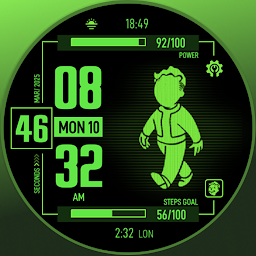
ARS Pip Walk
Retro-futuristic Digital watchface for Wear OS,blending adventure&survival vibes
Arsanna Studio
ARS Pip Walk is developed and provided by Arsanna Studio. LDPlayer offers the download service only.
VersionVaries with device
Rating4.0
CategoryPersonalization
Package namecom.arsanna.arspipwalk
ARS Pip Walk Description
With a design that mimics the interface of a multifunctional handheld device, this watchface allows you to experience the sensation of stepping into a world brimming with adventure, exploration, and advanced technology. Features such as personalized stat displays, health indicators, and intuitive navigation provide a user experience reminiscent of a device designed to enhance the quality of life for its users.
This watchface is perfectly suited for modern wearable devices, offering a blend of retro-futuristic aesthetics and practical functionality. With its detailed and character-rich design, you’ll feel as though you’re carrying a piece of a world filled with stories and mysteries on your wrist. Embrace the feeling of being part of a universe that combines technology, survival, and the spirit of exploration—all at your fingertips.
ARS Pip Walk for Your Watch. Supports Galaxy Watch 7 Series and Wear OS watches with API 30+. On the "Available on more devices" section, tap the button beside your watch on the list to install this watch face.
Features :
- Change Colors Styles
- Complications
- Animation
- 12/24 Hours Support
- Always on Display
After the watch face is installed, activate the watch face by these steps :
1. Open watch face selections (tap and hold the current watch face)
2. Scroll to the right and tap "add watch face"
3. Scroll down on the downloaded section
4. Tap the newly installed watch face
Open up


Currently, ARS Pip Walk APK download is not available. Please proceed to download from the Google Play Store.
Get from Play Store
1. Click "Get from Play Store
2. Download ARS Pip Walk from the Play Store
3. Launch and enjoy ARS Pip Walk
Is ARS Pip Walk safe for my device?
Open up
Yes, ARS Pip Walk follows the Google Play content guidelines to ensure safe use on your Android device.
What is an XAPK file, and what should I do if the ARS Pip Walk I downloaded is an XAPK file?
Open up
A file with .xapk extension is a compressed package file. It is a container file format that incorporates APK and additional associated files required for the installation.
The XAPK format was introduced to package the APK file and OBB file together for a seamless delivery and installation process.
XAPK format can help reduce the package size of application.
On mobile phones, users need to install the XAPK installer first, and then install XAPK files through that installer. You can find the installer here:https://apkcombo.com/how-to-install/. But on PC client, you just need to put the file on LDPlayer.
Can I play ARS Pip Walk on my computer?
Open up
Yes, you can play ARS Pip Walk on your computer by installing LDPlayer, an Android emulator. After installing LDPlayer, simply drag and drop the downloaded APK file into the emulator to start playing ARS Pip Walk on PC. Alternatively, you can open the emulator, search for the game or app you want to play, and install it from there.


