

BIMx
Explore, visualize, and collaborate on architectural design projects on the go.
Graphisoft SE
BIMx is developed and provided by Graphisoft SE.
Version2025.6590
Updated on
2024-11-06
Rating4.3
CategoryProductivity
Package namecom.graphisoft.bimx
Downloads100+
BIMx Description
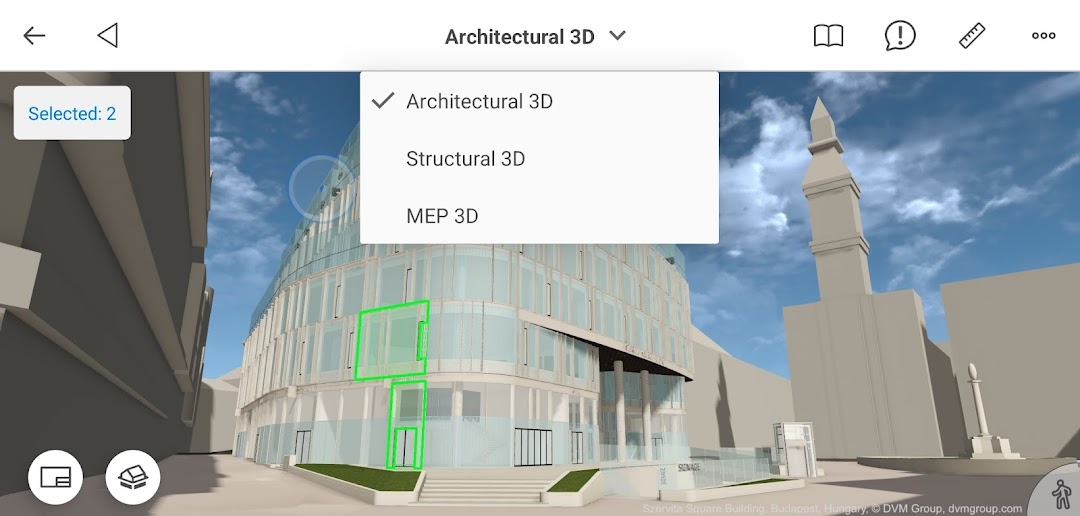
BIMx offers professional building visualization with game-like navigation to explore and visualize architectural projects. BIMx features the ‘BIMx hyper-model’ – allowing non-design professionals to explore and fully understand architectural design intent, view project deliverables, and access element level BIM data. BIMx links the 3D model with the relevant 2D documentation layouts, providing a seamless way to view the 3D cutaway model in the context of a 2D layout — and vice versa.
BIMx connects the construction site with the architect’s office for streamlined collaboration. Real-time model cut-throughs, in-context measuring and project markups in the model context make BIMx your best on-site BIM companion. Drive the design narrative on the building site for fast, specific client feedback.
Features:
• Hyperlinked 2D & 3D views with interactive markers
• Trace 2D drawings on 3D with animation
• Access project and building component-related BIM information
• Superfast 2D documentation viewer
• Game-like 3D navigation
• Gravity & Egress recognition
• Option to access a Hyper-model element from outside of the app
• Google Cardboard VR support on smartphones
• Real-time 3D cutaway
• Cut Plane Color Picker
• Shading options
• Shadow casting
• Sun positioning by date and time
• Measure in 3D and on 2D layouts
• Explore 3D models of any size thanks to the new streaming 3D engine
• Save Favorites
• Create compelling presentations
• Print support
BIMx Pro feature, available with Graphisoft account-based licensing:
• Issue creation
Joining BIMcloud in Hyper-models published from Teamwork projects unlocks integrated messaging.
Send your comments and suggestions to bimx@graphisoft.com!
Open up


Comments about BIMx Android Version
I love it. It is when you complete your drawing in ArchiCAD and then share your drawing to people who have no access to your ArchiCAD drawing model using BIMx app not only in 2D but also in 3D. This is another level, hope clients satisfy as they see realistic model of their proposed project.
Very nice app, although it lacks much guidance on how to use the app with a VR viewer. eg - how to move around? Do I have to use a joystick? Wouldn't it be better to have waypoints to click on? EDIT 1: Well, in the light of the answer and more exploration I've downgraded my review because it seems to me this could have been so much better than it is. No-one wants to wear Cardboard VR viewers, so a better way would have been to have integrated VR joystick functionality, or at least auto click on buttons (point, at the button, wait while the timer counts down, then autoclick). As things stand, you're on a constant walk without the ability to stop (unless you use the Cardboard viewer) which is poor and unhelpful for clients. Pity, because it's very close to being brilliant but by missing one function, it's not very practical. Could do better guys. EDIT 2: Looks like it will work with a joystick, but it took a couple of hours playing around with the joystick settings to get it connected to the app. In short, you can walk, stop, reverse all using a handheld Bluetooth joystick, which is pretty much most of what you'd like to do. So this time, I'm UPGRADING my rating. It is brilliant.
A handy tool but could be so much better. An anotate feature would be useful in 2d drawing mode. The measure feature would be useful it it would 'snap' to features/lines in 2d mode. Would also be good to be able to share drawings with dimensions from the measurement tool on. Its a shame the bimx explorer user cant decide on the section views they can see rather than the architect.
I love it. It is when you complete your drawing in ArchiCAD and then share your drawing to people who have no access to your ArchiCAD drawing model using BIMx app not only in 2D but also in 3D. This is another level, hope clients satisfy as they see realistic model of their proposed project.
Very nice app, although it lacks much guidance on how to use the app with a VR viewer. eg - how to move around? Do I have to use a joystick? Wouldn't it be better to have waypoints to click on? EDIT 1: Well, in the light of the answer and more exploration I've downgraded my review because it seems to me this could have been so much better than it is. No-one wants to wear Cardboard VR viewers, so a better way would have been to have integrated VR joystick functionality, or at least auto click on buttons (point, at the button, wait while the timer counts down, then autoclick). As things stand, you're on a constant walk without the ability to stop (unless you use the Cardboard viewer) which is poor and unhelpful for clients. Pity, because it's very close to being brilliant but by missing one function, it's not very practical. Could do better guys. EDIT 2: Looks like it will work with a joystick, but it took a couple of hours playing around with the joystick settings to get it connected to the app. In short, you can walk, stop, reverse all using a handheld Bluetooth joystick, which is pretty much most of what you'd like to do. So this time, I'm UPGRADING my rating. It is brilliant.
A handy tool but could be so much better. An anotate feature would be useful in 2d drawing mode. The measure feature would be useful it it would 'snap' to features/lines in 2d mode. Would also be good to be able to share drawings with dimensions from the measurement tool on. Its a shame the bimx explorer user cant decide on the section views they can see rather than the architect.
Is BIMx safe for my device?
Open up
Yes, BIMx follows the Google Play content guidelines to ensure safe use on your Android device.
What is an XAPK file, and what should I do if the BIMx I downloaded is an XAPK file?
Open up
A file with .xapk extension is a compressed package file. It is a container file format that incorporates APK and additional associated files required for the installation.
The XAPK format was introduced to package the APK file and OBB file together for a seamless delivery and installation process.
XAPK format can help reduce the package size of application.
On mobile phones, users need to install the XAPK installer first, and then install XAPK files through that installer. You can find the installer here:https://apkcombo.com/how-to-install/. But on PC client, you just need to put the file on LDPlayer.
Can I play BIMx on my computer?
Open up
Yes, you can play BIMx on your computer by installing LDPlayer, an Android emulator. After installing LDPlayer, simply drag and drop the downloaded APK file into the emulator to start playing BIMx on PC. Alternatively, you can open the emulator, search for the game or app you want to play, and install it from there.


