
Pixlr AI Photo & Video Editor
Video Generator & Filters, Aesthetic Collages, AI Face Swap, Remove Object & BG
Pixlr Pte Ltd
Pixlr AI Photo & Video Editor is developed and provided by Pixlr Pte Ltd.
Version3.9.3
Updated on
2025-10-21
Rating3.0
CategoryPhotography
Package namecom.pixlr.express
Downloads100+
Pixlr AI Photo & Video Editor Description
Capture any moment and let your creativity shine with over 2 million combinations of FREE effects, overlays, and filters. Seamlessly share your photos with friends or followers through email, Instagram, Facebook, TikTok, or any other social network.
New AI-Powered Features
AI Generative Fill – Highlight any area in your photo and watch as Pixlr's AI-powered generator seamlessly fills it with objects.
AI Remove Object – Effortlessly remove any object from your image, and let our AI intelligently fill in the blanks.
AI Remove Background – Enjoy pixel-perfect background removal, thanks to our cutting-edge AI editor.
Comprehensive Photo Editing Features
Explore seasonally updated multi-layered Social Media templates designed to elevate your digital content.
Create stunning photo collages effortlessly with a variety of preset collage designs, grid styles, customized ratios, and backgrounds.
Instantly adjust the color of your photos in one click using Auto Fix, making your images pop with vibrant hues.
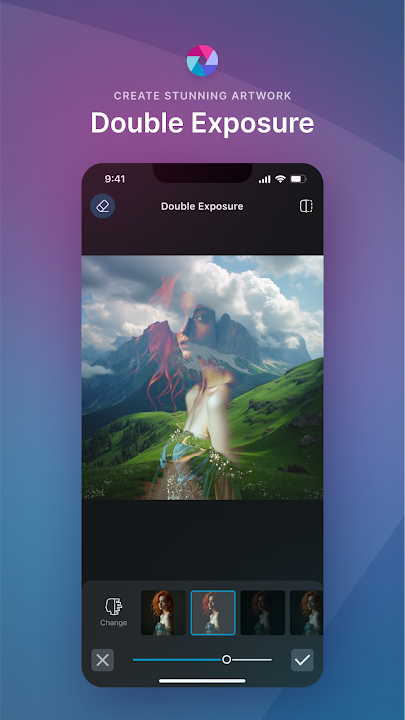
Experiment with Double Exposure to create breathtaking effects using layers and adjustable transparency.
Add artistic flair to your images with Stylize effects like pencil sketch, poster, watercolor, and more.
Remove blemishes, red-eye, smoothen skin, or whiten teeth effortlessly with simple and precise tools.
Highlight specific colors in your photo using the Color Splash effect, or create depth with Focal Blur.
Choose from a wide range of effect packs to give your photos the look and feel you desire.
Adjust the tone of your photos using overlays – amplify, cool down, or add surreal shades to your images.
Easily add text to your photos with a variety of fonts, ensuring your message stands out.
Complete your editing with the perfect border – select a style that complements your photo.
Keep your content fresh with our growing library of additional effects, overlays, and border packs.
Save time by keeping track of your favorite effects and overlays with the convenient Favorites button.
Quickly crop and resize images to your desired dimensions before saving and sharing.
Connect with Us
We value your feedback and ideas, as they help us make Pixlr the best photo editor experience possible. Connect with us on Instagram (@pixlr), TikTok (@pixlrofficial), or Facebook (/Pixlr) to stay updated with the latest features and news.
For support or bug reporting, feel free to reach out to us at info@pixlr.com.
Privacy Policy | Terms of Use
Open up



Comments about Pixlr AI Photo & Video Editor Android Version
I have been loyal to this app for almost 10 years now. I use it for so many different photo editing purposes, I love the ease of use and consistency of the filters. My only reason for a 3 star review is home many times this app has crashed on me in the final stages of a deep edit. I'm stubborn, I like to stick with a company I know but it is so incredibly crushing to be so deep into an important project just to suddenly lose it all with nothing more I can do but start over.
Still a great app but have a tiny issue. I do appreciate the dark border being back, I was wondering about the white that surrounds the image you're editing. I was wondering if it could be changed to the dark gray as the border. You can't see the home or the "done" buttons if you zoom out. Plus again it'll be much easier on the eyes if it matched with the dark gray border.
Because the app is so problematic I continually update it with whatever the current problem is. Currently the image will only save about half the time. The other half the time you were going to lose whatever work you put into your project. Not even sure this is the worst part of the app. Because it is so functional, a lot of people will torture themselves and keep using an app like this. But every update seems to be a regression. Not being able to save my work reliably... that's not good.
I have been loyal to this app for almost 10 years now. I use it for so many different photo editing purposes, I love the ease of use and consistency of the filters. My only reason for a 3 star review is home many times this app has crashed on me in the final stages of a deep edit. I'm stubborn, I like to stick with a company I know but it is so incredibly crushing to be so deep into an important project just to suddenly lose it all with nothing more I can do but start over.
Still a great app but have a tiny issue. I do appreciate the dark border being back, I was wondering about the white that surrounds the image you're editing. I was wondering if it could be changed to the dark gray as the border. You can't see the home or the "done" buttons if you zoom out. Plus again it'll be much easier on the eyes if it matched with the dark gray border.
Because the app is so problematic I continually update it with whatever the current problem is. Currently the image will only save about half the time. The other half the time you were going to lose whatever work you put into your project. Not even sure this is the worst part of the app. Because it is so functional, a lot of people will torture themselves and keep using an app like this. But every update seems to be a regression. Not being able to save my work reliably... that's not good.
Is Pixlr AI Photo & Video Editor safe for my device?
Open up
Yes, Pixlr AI Photo & Video Editor follows the Google Play content guidelines to ensure safe use on your Android device.
What is an XAPK file, and what should I do if the Pixlr AI Photo & Video Editor I downloaded is an XAPK file?
Open up
A file with .xapk extension is a compressed package file. It is a container file format that incorporates APK and additional associated files required for the installation.
The XAPK format was introduced to package the APK file and OBB file together for a seamless delivery and installation process.
XAPK format can help reduce the package size of application.
On mobile phones, users need to install the XAPK installer first, and then install XAPK files through that installer. You can find the installer here:https://apkcombo.com/how-to-install/. But on PC client, you just need to put the file on LDPlayer.
Can I play Pixlr AI Photo & Video Editor on my computer?
Open up
Yes, you can play Pixlr AI Photo & Video Editor on your computer by installing LDPlayer, an Android emulator. After installing LDPlayer, simply drag and drop the downloaded APK file into the emulator to start playing Pixlr AI Photo & Video Editor on PC. Alternatively, you can open the emulator, search for the game or app you want to play, and install it from there.
Program Available in Other Languages
下載 Pixlr 照片處理[TW]
Pixlr AI Photo Editor 다운로드[KR]
Tải Pixlr AI Photo Editor[VI]
ดาวน์โหลด Pixlr AI Photo Editor[TH]
Скачать Pixlr AI Photo & Video Editor[RU]
Baixar Pixlr Editor de Foto, Video IA[PT]
Descargar Pixlr AI: Editor de Fotos IA[ES]
Télécharger Pixlr AI Photo Editor[FR]
Pixlr KI Bildbearbeitung - AI herunterladen[DE]
Pixlr AI写真編集, 加工をダウンロード[JP]
Unduh Pixlr AI Photo Editor[ID]


